10 Popular Apps and the Personal Data They Collect
A UK study ranked 10 popular apps by linked data points. Here’s what it found and how to limit the information apps can access.


The privacy concern with everyday apps isn’t limited to a stolen password. Apps can collect information about where people go, what they buy, who they contact and what they watch or listen to. If that information is exposed or misused, the consequences can reach well beyond the app itself.

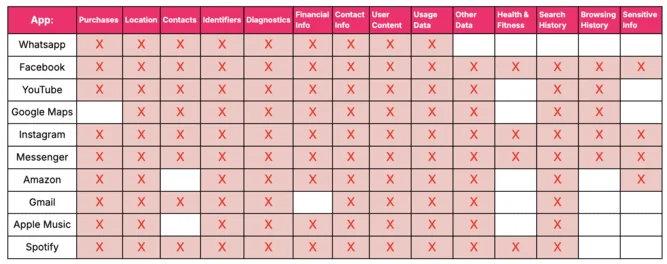
A study by digital eSIM provider Nomad used Apple App Store privacy disclosures to compare 10 popular apps in the UK. Facebook and Instagram topped its list, each with 17 private data points stored. The figures describe the types of data associated with each app in the study; they don’t establish that an app has been breached or that every user’s data is exposed.

That distinction matters. An app can collect information for features, personalization or advertising without having been compromised. The risk depends on what it collects, how it is stored and shared, and how well the app and the services connected to it are protected.

What makes an app a privacy risk
Permissions are a useful first check. If an app requests access to a location, address book, camera, microphone or local files that its features don’t require, users can deny that access and see whether the app still works as expected. Some permissions are optional, but an app may limit a feature when access is refused.

Security also depends on how an app protects information in transit and on the device. Weak account authentication, insufficient encryption, or sensitive data stored locally can make information easier to access if a device or account is compromised. Apps downloaded outside established app stores may carry additional risks because their source and integrity can be harder to verify.

Public Wi-Fi can add exposure, particularly when users sign in to accounts or handle sensitive information. A VPN can encrypt traffic between a device and the VPN service, but it doesn’t prevent an app from collecting data that the user has chosen to share with it. Nor does it protect an account with a weak password.

Alan Bavosa, vice president of security products at Appdome, describes two broad sources of risk: malicious apps disguised as legitimate services, and legitimate apps that lack strong protections. He cited mobile malware such as BrasDex, Xenomorph, TeaBot and EventBot, which can be designed to collect sensitive information, take over accounts or carry out fraudulent activity. He also noted that developers face security challenges as attacks change and app protections require ongoing work.

How the 10 apps ranked
Nomad’s comparison counted private data points stored for each app. It placed Facebook and Instagram first, followed by Spotify. The ranking is a measure of data categories in the study, not a direct score of security quality or the likelihood that a particular user will suffer a breach.

| Rank | App | Private data points stored |
|---|---|---|
| 1 | 17 | |
| 2 | 17 | |
| 3 | Spotify | 15 |
| 4 | YouTube | 14 |
| 5 | Facebook Messenger | 14 |
| 6 | Google Maps | 11 |
| 7 | Amazon | 11 |
| 8 | Apple Music | 10 |
| 9 | 10 | |
| 10 | Gmail | 10 |
What the individual apps collect
Facebook and Instagram
Facebook’s position at the top of the ranking reflects the breadth of information connected to its services. Nomad lists possible exposure across purchase records, location, contacts, identifiers, diagnostic information, financial details, browsing and search history, and health and fitness data. The study also points to data collection for advertising and activity tracking across services.

Features that connect Facebook to other sites can extend the trail of activity beyond the app. The source cites third-party “like” features and facial recognition as additional privacy concerns. What users share themselves also matters: profile details, connections and public posts can reveal information even if no account is compromised.

Instagram, which is owned by Meta, collects a wide range of information and may share data within the company and with outside firms for advertising and other purposes. The categories named in the source include photos, videos, comments, liked posts, purchases, contacts, location, device details and demographic information. It also mentions facial recognition data and text messages as information that could be at risk. Such categories should be understood as the source’s account of potential collection and exposure, not as evidence that every item is collected from every user.

Spotify, YouTube and Facebook Messenger
Spotify’s 15 data points put it third. The service can record listening activity, including playlists and how often songs are played, alongside search and survey information, purchases and payment details. The source also names voice data, location, phone sensor information, contacts, photos and other media. These details can support service functions and personalization, but sharing with outside firms for promotion and advertising broadens the number of parties that may handle them.

YouTube’s listed data includes watch and search history, comments, uploaded content and location. The platform uses this information to personalize results and advertising, improve its service and address technical problems. The source also warns that malicious software can target accounts, and that videos or identifying information may be posted without a person’s permission. This is a particular concern where a minor’s information is involved.

Facebook Messenger ranked fifth with 14 data points. Beyond the risks of information collection, messaging services can be used to deliver scams that impersonate friends or family and ask for money or personal details. Users should be cautious with unexpected requests, even when a message appears to come from someone they know. The source also raises concerns about access to device functions and private files; users can review the app’s permissions to see which functions it can use.

Google Maps, Amazon and Apple Music
Google Maps ranked sixth. Location history and diagnostic information can help provide directions, traffic updates and information about busy places, but location records can also reveal patterns such as a person’s home and workplace. Seth Geftic, vice president of product marketing at Huntress, characterized the app as a comparatively lower risk while cautioning that stolen location history could expose movement patterns. Users who don’t need location history can review the relevant account and device settings.

Amazon’s app collects information about product searches, orders and interactions with its services, along with delivery, contact, payment and demographic details. The source says the company uses these data to personalize advertising, improve services and help detect fraud. It also notes past privacy and security concerns, including the AMZReview issue, data tracking and disputes involving privacy practices. A company’s stated use of information and the amount of information it gathers are separate questions: users can still reduce exposure by limiting saved details and reviewing account settings.
Apple Music ranked eighth. It may collect searches, downloads, listening activity, library additions, account and device details, profile information and IP addresses. The source says Apple may use this information to personalize the service, pay royalties, prevent fraud and improve its products, and may share it with service providers, publishers, developers and affiliated companies. Apple Music had about 93 million subscribers worldwide as of June 2023, according to the figure cited in the source.
WhatsApp and Gmail
WhatsApp ranked ninth with 10 data points. The source lists connection and device details, app usage, cookies, contact information and profile pictures among the data it may collect. Its end-to-end encryption protects message contents in transit between participants, but that does not mean all related information is private: metadata, such as details about connections and usage, can still matter. Backups also deserve attention, because their protection may depend on the backup settings and service being used.
Phishing, malicious software and unsafe third-party integrations can put accounts and data at risk. Users should be cautious with links and attachments and check that a message or request is genuine before sharing a code, password or personal detail.
Gmail also had 10 points in the study. The source raises concerns about third-party data sharing, email tracking and account recovery. It describes Gmail as relying on Transport Layer Security (TLS) rather than automatically encrypting email content end to end. TLS helps protect data while it travels between systems, but it is not the same as end-to-end encryption, where only the communicating parties can read the message. Strong account security and care with recovery options are therefore important alongside transport encryption.
Reducing exposure while keeping the apps
People don’t have to stop using familiar services to make privacy choices. Start by checking each app’s permissions and removing access that isn’t needed. Kee Jefferys, co-founder of Session, advises denying permissions for features a user doesn’t plan to use—for example, camera and microphone access when those functions aren’t needed. Settings can change over time, so it’s useful to review them periodically.
- Share less sensitive information. Avoid entering financial or other sensitive details through an app when the task can be completed through a more trusted channel. Consider what posts, profile details and location clues reveal when combined.
- Use unique, strong passwords. A password manager can help create and store distinct credentials for each service. Turn on additional account verification where it’s available, and protect account recovery methods as carefully as the password itself.
- Keep apps and devices updated. Updates can address security flaws and add protections. Install them from the device’s established app store or the app’s own update mechanism.
- Review browser settings. Private browsing can reduce what a browser saves on a device after a session, but it does not make a person anonymous to the sites they visit or prevent apps from collecting information. Clearing cookies and history can help limit local records.
- Check for HTTPS. A secure connection helps protect information moving between a browser and a website. It doesn’t prevent the site from collecting information after it arrives.
- Consider a VPN on untrusted networks. A VPN can conceal the device’s IP address from sites and encrypt traffic between the device and the VPN provider. It shifts trust to that provider and doesn’t replace careful app permissions or account security.
- Keep a backup. A separate backup can help recover files if a device is lost or damaged. Protect the backup account and check what information it contains.
Dr. Brian Callahan, director of the Rensselaer Cybersecurity Collaboratory at Rensselaer Polytechnic Institute, argues that the most effective way to protect information is to avoid sharing it in the first place. Public posts can reveal location, relationships and work details, sometimes in combination. That kind of exposure doesn’t require a technical breach: people may disclose the clues themselves over time.
Nomad’s ranking is a prompt to examine what apps collect, rather than a forecast of which one will be compromised. Users can make a practical start by limiting permissions, tightening account security and sharing less. For developers and organizations, the same findings underline the need to minimize data collection and protect the information a service does need.