A Custom Resolution Makes Microsoft’s Surface Laptop Ultra a Better Gaming Laptop
A 1764×1176 display mode improves gaming speed and sharpness, bringing the Surface closer to an older RTX 3080 laptop at less than half the power.
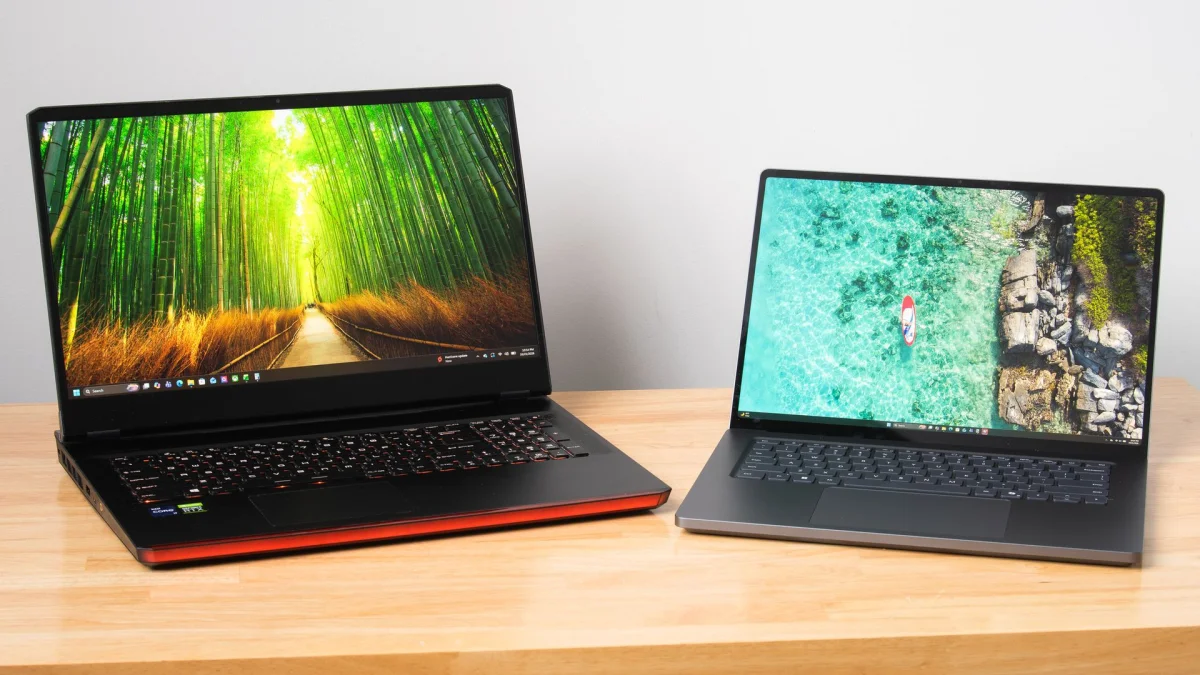
The Surface Laptop Ultra’s 3270×2180 display is a tough target for games. A custom 1764×1176 resolution makes better use of its 3:2 panel, raising frame rates while keeping the image sharper than Microsoft’s lower-resolution option. In testing with Control Resonant, that change brought the laptop close to an older RTX 3080 Mobile system’s performance, with lower power draw and a lighter travel setup.
Why native resolution is a problem
Nvidia’s RTX Spark platform prioritizes local AI inference and content creation, but the Surface Laptop Ultra has features suited to gaming too: a 120Hz screen, keyboard vents that help keep the WASD area cool, and unusually capable built-in speakers. The panel can reach 2000 nits with HDR content.
Its native resolution, however, has nearly as many pixels as a 4K 16:9 display: just 14% fewer. That puts substantial work on DLSS, whose upscaling cost rises with output resolution. The panel’s 3:2 shape adds a separate complication. Filling it with 16:9 or 16:10 game content can stretch objects and character models; playing in a smaller window avoids distortion but can feel cramped.
Microsoft includes a 1600×1024 mode, but its roughly 1.6 megapixels are below the 2.07 megapixels of 1920×1080. Upscaling from that mode leaves a visibly soft image. A more useful target is a 3:2 resolution with a pixel count closer to 1080p: 1764×1176.
Adding a 3:2 display mode
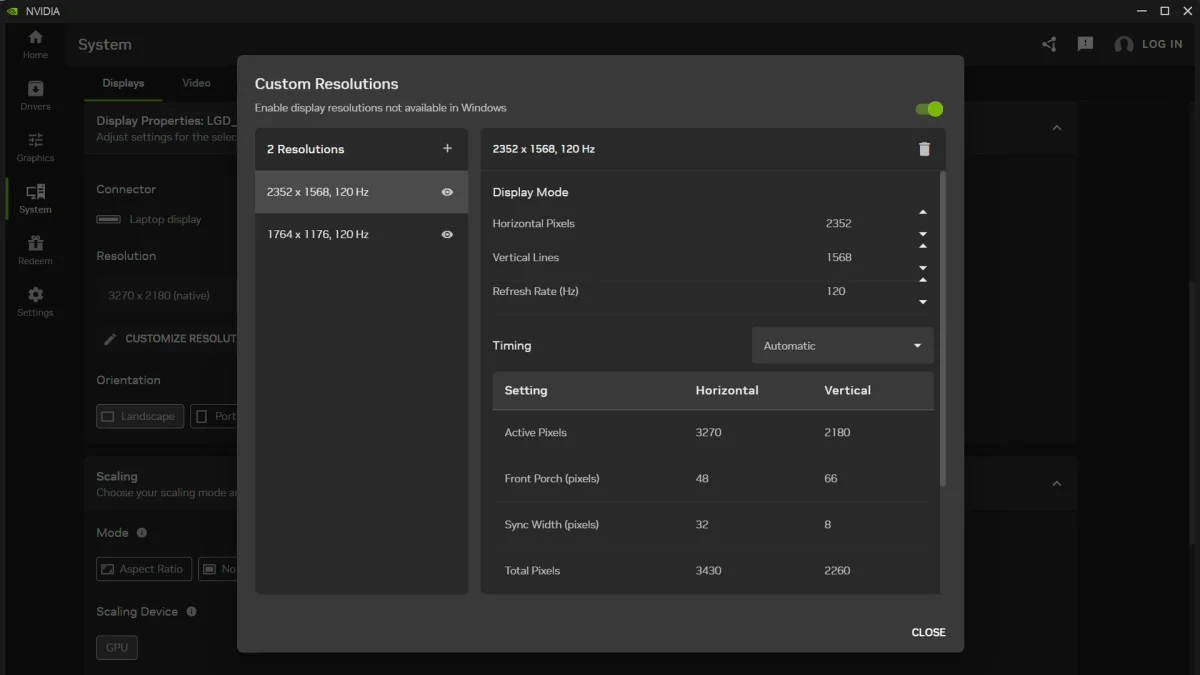
The Nvidia Control Panel isn’t available on Windows on Arm, but the Nvidia App can create custom resolutions. Under System, open Display Properties, choose “Customize Resolution,” and add 1764×1176 at 120Hz. The reviewer confirmed the mode worked. For a 3:2 resolution with about the same 3.7 megapixels as 2560×1440, the article suggests 2352×1568.
The Nvidia App also offers scaling controls. Selecting “Aspect Ratio” can preserve 16:9 or 16:10 content with letterboxing when the display is set to a matching resolution. For gaming on the Surface’s 3:2 panel, though, the custom 1764×1176 mode uses the full screen without stretching the picture.
What the game test shows
To compare the Surface with a conventional gaming laptop, the reviewer tested an older 17-inch system with a Core i9-11980HK and 16GB RTX 3080 Mobile. Optiscaler enabled Intel Xe Frame Generation and Xe Low Latency on that machine, helping account for the Surface’s native frame generation support.
Both systems ran Control Resonant with the High raster preset and Medium ray tracing preset. The settings use DLSS Ray Reconstruction to improve ray-traced image quality. At the Surface’s native 3270×2180 resolution, DLSS Ultra Performance and 2X frame generation produced a 63.5 FPS average, 38.1 FPS 1% lows, and 87.9 ms average input latency. DLSS rendered from 1090×727 in this configuration. That result clears 60 FPS on average, but the latency makes the experience feel unresponsive and leaves little room to increase frame generation.
At 1764×1176, the Surface ran DLSS Quality from a 1176×874 input resolution, delivering 83.4 FPS on average, 42.9 FPS for 1% lows, and 67.8 ms average input latency. The RTX 3080 Mobile laptop, tested at 1920×1080 with the same image-quality settings, reached 87.1 FPS average, 53 FPS 1% lows, and 69 ms latency. The older system holds an advantage in 1% lows, while the Surface’s average frame rate and latency are in a similar range.
The Surface can also use 3X multi-frame generation at 1764×1176: the reviewer reports 123 FPS average, 55 FPS 1% lows, and 71 ms latency. That gives it room to raise displayed frame rates, though frame generation doesn’t remove the need to consider input response.
Power and portability change the comparison
The RTX 3080 laptop drew 250W from the wall during the test. The Surface drew between 110W and 120W under load, measured at its USB-C connection. The older laptop and its large power adapter weigh more than 9 pounds (4.1kg); the Surface and its 140W adapter weigh 5.3 pounds (2.39kg).
That difference matters for gaming away from a desk. The Surface is still substantial, but it can fit on a tray table or a lap, and the reviewer says its battery can last through a transcontinental U.S. flight with charge left at either end. In this test, the custom resolution turns an awkward native-resolution target into a more practical gaming mode. It lets the Surface approach the older laptop’s experience while drawing less than half the power, and its support for 3X frame generation extends options the RTX 3080 system doesn’t offer.